
Table of Contents
- Why Sensitivity Is the Foundation of Aim
- Understanding PUBG Mobile Sensitivity Settings
- Camera Sensitivity vs. ADS Sensitivity
- Gyroscope Settings — The Secret Weapon
- Scope-Specific Sensitivity Settings
- Pro Player Sensitivity Presets Table
- Device-Specific Tips: iPad vs. Phone
- Sensitivity Conversion Across Devices
- Aim Training to Lock In Your Settings
- Frequently Asked Questions
Why Sensitivity Is the Foundation of Aim
Every PUBG Mobile player, no matter the rank, ends up chasing the perfect sensitivity eventually. Makes sense — your settings decide how your finger movements turn into what happens on screen. Too high and you're over-correcting on every spray, missing wide. Too low and you can't track a moving target or flick to an angle you didn't expect. Get it right, though, and it disappears entirely: your crosshair just goes where you meant it to, without you thinking about it.
Three years of streaming and coaching hundreds of players from Bronze to Conqueror has taught me one thing that holds up every time: players who actually sit down and tune their sensitivity systematically see 30-50% better accuracy within two weeks. I'm not guessing here — I've tracked before-and-after numbers on my coaching students, and the curve is steep and it repeats. The reason comes down to consistency. Dial in your sensitivity and every rep reinforces the same neural pathway. Get it wrong and your brain is stuck compensating instead of just executing.
This guide walks through every category — camera, ADS, gyroscope, scope-specific multipliers — along with the exact presets top pros run, device-specific tips, and a training routine that locks everything in for good. Flagship iPhone, mid-range Android, or iPad, there's a starting point in here for you to build on.
Understanding PUBG Mobile Sensitivity Settings
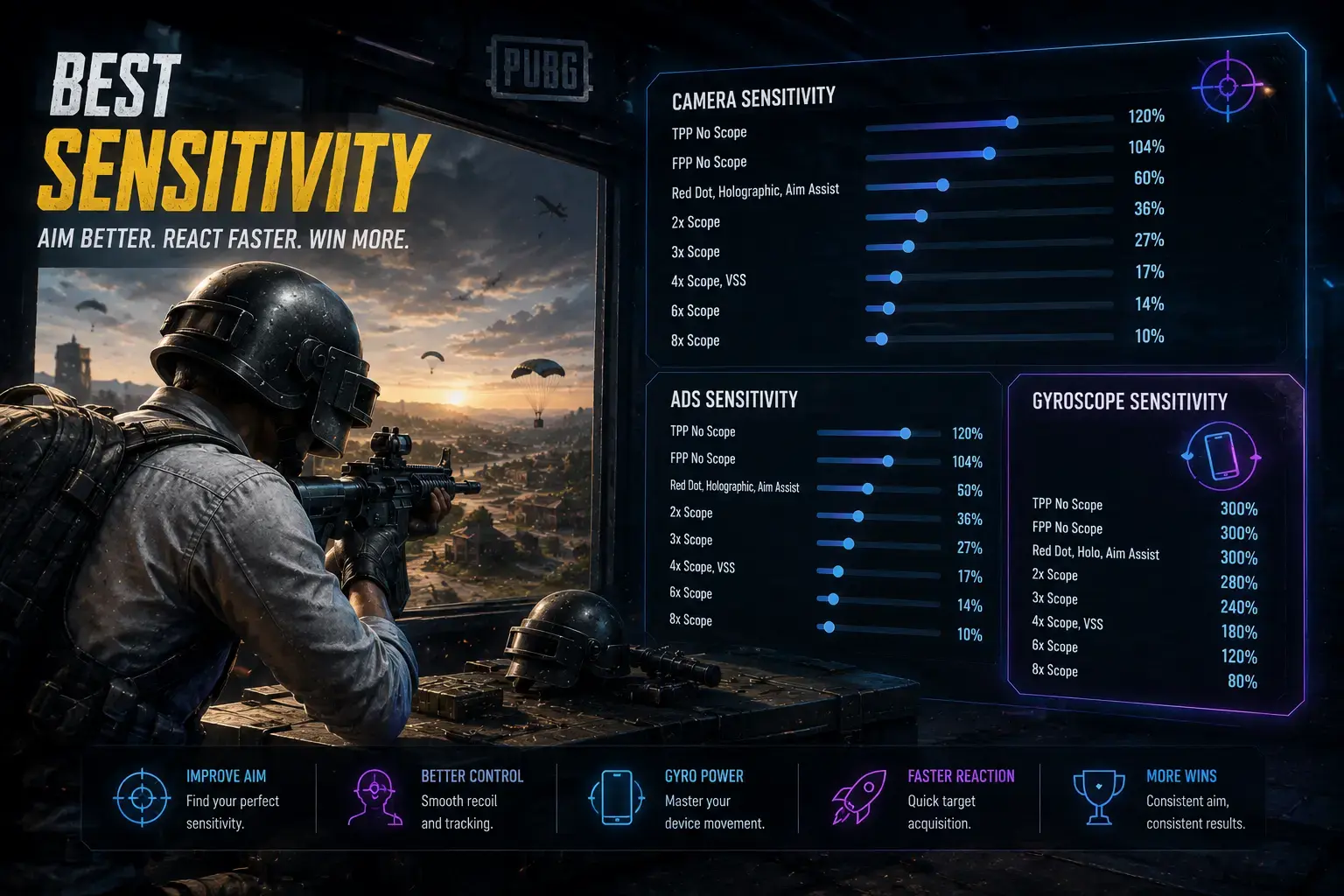
PUBG Mobile's sensitivity system is one of the most granular in mobile gaming, honestly. Before touching any numbers, it helps to know what each setting is actually doing. There are three main categories — Camera, ADS, and Gyroscope — and each one breaks down further by scope magnification, from hip-fire all the way to 8x.
Camera Sensitivity is your general look-around speed — how fast the view moves when you drag your finger without aiming down sights. Crank it up and you can scan your surroundings fast, but looting starts to feel twitchy. Keep it low and looting feels smoother, though turning around now needs a bigger finger movement.
ADS Sensitivity is your aim speed once you're looking through sights, and this is the one that actually decides whether shots land. It's split by scope type — red dot, 2x, 3x, 4x, 6x, 8x — because each zoom level changes how far your crosshair travels per millimeter of finger movement.
Gyroscope Sensitivity taps into your device's motion sensors, letting you aim by physically tilting the phone or tablet. Tilt forward or back and the view moves up or down; tilt left or right and it follows. It gives you finer control than thumbs alone, particularly for recoil compensation and long-range micro-adjustments — which is why most pros run gyro ADS values 200-400% higher than their regular ADS sensitivity.
The Golden Rule of Sensitivity
Your sensitivity should be as high as possible while still allowing you to consistently hit a stationary target at 50 meters with a 3x scope. If you can do that, your sensitivity is in the right ballpark. If you cannot, lower your ADS sensitivity by 5% and try again. Repeat until you find your ceiling.
Camera Sensitivity vs. ADS Sensitivity
The single most common mistake I see is players running identical camera and ADS values. They serve completely different jobs and should be tuned separately. Camera sensitivity is about speed and range — you want a single full swipe to rotate your view roughly 180 degrees, so you can check your flanks fast without lifting your thumb to re-swipe.
ADS sensitivity is about precision, plain and simple — in a gunfight, your crosshair movement needs to be predictable. A solid baseline is 20-40% lower than your camera sensitivity depending on magnification. Camera at 100? Red dot ADS around 70-80, 3x around 50-60, 6x around 30-40. Higher zoom always means lower sensitivity.
Here's my starting baseline for a standard 6.5-inch phone display:
- Camera Sensitivity (Third Person): 95-110. This gives you approximately 180-degree rotation per full swipe. Adjust upward if you have a smaller screen or play with lower DPI.
- Camera Sensitivity (First Person): 85-100. First-person mode feels more zoomed in, so slightly lower sensitivity maintains control.
- ADS Red Dot / Holographic: 65-80. These 1x optics mirror your hip-fire aiming feel. Start at 75 and adjust.
- ADS 2x Scope: 55-70. The 2x provides moderate zoom, so a moderate reduction keeps your muscle memory consistent.
- ADS 3x Scope: 45-60. The 3x is the most versatile scope for mid-range fights. This setting should feel very controlled.
- ADS 4x Scope: 35-50. The 4x is typically used for DMRs and snipers. Precision tracking is paramount.
- ADS 6x Scope: 25-40. The 6x is high-zoom. Low sensitivity helps you make fine adjustments at long range.
- ADS 8x Scope: 15-30. At this level, even small movements translate to major crosshair displacement.
Gyroscope Settings — The Secret Weapon
If you're not running gyroscope, you're leaving accuracy on the table — plain and simple. Gyro lets you make micro-adjustments your thumbs physically can't. Think about trying to track a moving target at 150 meters with a 4x scope: your thumb naturally gets jittery at that range because fine control and gross control share the same muscle group. Gyro splits those two apart — thumbs handle target acquisition and big flicks, your wrist handles the fine tracking and recoil control.
Pros like Scout, Mortal, and Jonathan all run two separate gyro profiles — one for camera, one for ADS. Camera gyro sits low, usually 10-30%, so you're not swinging your view around every time your hand shifts while looting. ADS gyro sits much higher, 200-400%, because in combat you want even small tilts to translate into precise aim.
These are my own gyro settings — the ones behind a 22% headshot rate at Ace rank:
- Gyro Camera (TPP): 15% — just enough for subtle look-around without disrupting looting muscle memory.
- Gyro Camera (FPP): 25% — slightly higher in FPP because the narrower field of view benefits from gyro-assisted scanning.
- Gyro ADS Red Dot / Holographic: 280% — provides rapid micro-correction during close-range spray transfers.
- Gyro ADS 2x: 250% — slightly lower than 1x because the zoom amplifies movement.
- Gyro ADS 3x: 220% — the sweet spot for mid-range recoil control with the M416 or M762.
- Gyro ADS 4x: 180% — precision tracking for DMR tapping at range.
- Gyro ADS 6x: 140% — controlled long-range adjustments.
- Gyro ADS 8x: 100% — at this magnification, even 1% gyro movement matters.
"Gyroscope changed my gameplay more than any single setting. Once you train your wrist to handle recoil compensation, your thumbs are freed up to focus on positioning and movement. It is like upgrading from one hand to two." — Ana Volkov
Scope-Specific Sensitivity Settings
Each scope has its own feel, and understanding that nuance is what takes you past the baseline numbers. Red dot and holographic sights are your close-to-mid range optics, and since they have no magnification, their ADS sensitivity should feel close to your hip-fire sensitivity — a lot of pros actually run identical camera and red dot ADS values to keep things consistent.
The 3x deserves its own callout — it's the most versatile scope in the game, offering enough zoom for mid-range while staying usable up close. It's the go-to for most pros running an M416 or M762, since it balances magnification with field of view better than anything else. Tune it carefully: too high and you'll over-flick at mid-range, too low and you'll lose enemies pushing your position.
The 6x is unusual because you can scale it down to 3x, which raises a real question: tune it for native 6x, or for the scaled-down 3x mode? I set mine for the scaled-down 3x, since that's how most players actually use it day-to-day — matched to my regular 3x sensitivity. When I do toggle to full 6x zoom, the slight mismatch is manageable, since you're rarely engaging at that range under real pressure anyway.
Pro Player Sensitivity Presets Table
The table below has the confirmed competitive settings from top players as of July 2026. Treat these as starting points, then nudge things 2-5% at a time until it feels like yours.
| Setting | Ana Volkov | ScoutOP | Jonathan | Mortal |
|---|---|---|---|---|
| Camera TPP | 105 | 98 | 112 | 100 |
| Camera FPP | 92 | 88 | 99 | 91 |
| ADS Red Dot | 76 | 72 | 82 | 69 |
| ADS 2x | 62 | 58 | 68 | 55 |
| ADS 3x | 52 | 48 | 58 | 46 |
| ADS 4x | 40 | 38 | 46 | 36 |
| ADS 6x | 33 | 30 | 38 | 28 |
| ADS 8x | 22 | 20 | 26 | 18 |
| Gyro Camera | 15% | 20% | 12% | 25% |
| Gyro ADS 1x | 280% | 260% | 310% | 240% |
| Gyro ADS 3x | 220% | 200% | 250% | 190% |
| Gyro ADS 6x | 140% | 130% | 165% | 120% |
| Device | iPhone 16 Pro | iPad Pro M4 | OnePlus 13 | Samsung S25 Ultra |
How to Use This Table
Choose the pro player whose device size most closely matches yours. If you use an iPad, start with ScoutOP's settings. If you use a standard phone, start with Ana Volkov's or Jonathan's. Play 10-15 matches without changing anything, then adjust each setting by 2-3% at a time until the aim feels natural.
Device-Specific Tips: iPad vs. Phone
The device you're on changes how sensitivity feels at a physical level. A bigger iPad screen gives you room for finer finger movements but needs bigger gestures for full rotations. A phone screen is smaller and leaves less room to sweep, but rotates faster for less effort. Copy a pro's settings straight from iPad to phone, or the reverse, and you won't get the same result — the physical setup is just too different.
On an iPad (10-13 inches), you'll generally want lower sensitivity than phone players — more screen real estate means less sensitivity gets you the same crosshair movement. Most iPad pros sit in the 75-95 camera sensitivity range with ADS 10-15% lower than their phone-playing counterparts. Gyro also works better on iPad, since the extra device mass gives you more stable tilt control — which is why iPad players typically run 20-30% lower gyro values for the same feel.
On a phone (6-7 inches), you need higher values to make up for the smaller screen — typically 95-120 on camera and ADS toward the top of the recommended range. The real challenge is that your thumbs just don't have much room to work with, which makes gyroscope training even more worthwhile. If you're on phone, put in the extra gyro reps — it directly compensates for what small-screen thumb aiming physically can't do.
Sensitivity Conversion Across Devices
Switching between devices — phone during the day, iPad at night, say — needs a systematic way to keep your aim consistent. The core idea: sensitivity should scale inversely with screen diagonal. A bigger screen at the same sensitivity number will feel faster, because each millimeter of finger movement now covers a larger share of the screen width.
My conversion formula is simple: multiply your current sensitivity by the ratio of your old screen diagonal to your new one. Sensitivity of 100 on a 6.5-inch phone, moving to an 11-inch iPad? That's 100 × (6.5/11) ≈ 59 — so start there and fine-tune by feel. It's not a perfect formula, since aspect ratio and resolution matter too, but it gets you within 5-10% of ideal and saves you dozens of matches of blind guessing.
Refresh rate matters too. Higher refresh displays — 90Hz, 120Hz, 144Hz — give you smoother visual feedback, which often makes aim feel more controllable, and a lot of players moving from 60Hz to 120Hz find they can actually drop their sensitivity slightly because tracking gets easier. Going the other way, from 120Hz back to 60Hz, usually calls for a small increase to make up for the choppier motion.
Aim Training to Lock In Your Settings
Finding the right numbers is only half the job. The other half is training your muscle memory to execute those settings without thinking. That memory comes from repetition — thousands of targeted micro-movements that teach your brain to link a specific finger drag distance to a specific crosshair movement. Skip the structured training and you'll never fully internalize your settings, no matter how good the numbers are on paper.
Here's the exact routine I run with my coaching students, built to lock settings in within 14 days:
Week 1 — Foundation (20 minutes daily): Head into the training ground with a bare M416 and red dot sight, and stand 25 meters from the target wall. Flick between five points in sequence — center, top-left, top-right, bottom-left, bottom-right — one fluid motion each, no adjusting after you land. 100 reps a day. You're not trying to hit every flick perfectly here; you're building the neural pathway between finger movement and crosshair response. By day seven, you should notice flicks landing closer without you consciously correcting.
Week 2 — Integration (20 minutes daily): Kit out the M416 — thumb grip, tactical stock, compensator — and move to 50 meters for spray transfers. Set three targets five meters apart. Spray 10 into the left one, transfer to the middle, spray 10, transfer to the right, spray 10 — each transfer one continuous motion. Record it and review frame by frame afterward. Crosshair overshoots and you're pulling it back? Sensitivity's too high. Undershooting every transfer? Too low.
Two weeks in, and it should feel automatic. That's your cue to stop thinking about sensitivity entirely and put your attention back on game sense, positioning, strategy. Your aim keeps improving passively from here because the muscle memory now has something solid to build on.
Track Your Accuracy with FragTrack
FragTrack's AI-powered screenshot analysis can measure your accuracy metrics over time — including headshot percentage, accuracy by weapon, and accuracy by distance. Upload your match results screenshots after each session to see whether your sensitivity adjustments are translating into real improvement. The dashboard shows trend lines for 17 different performance indicators so you can make data-driven decisions about your settings.
Your sensitivity isn't a set-it-once thing. It should shift as your skills grow, as you switch devices, and as the game itself changes with updates. Keep adjustments systematic — one setting at a time, small increments, at least 50 matches between changes. Trust the process, put in the training time, and your aim will get to places you didn't think were possible on a touchscreen.
At the end of the day, sensitivity is personal — no pro preset is going to fit you perfectly on the first try. Use what's in this guide as smart starting points, layer in the device-specific advice, apply the conversion formula if you switch devices, and give the training routine its full two weeks. Come out the other side and your sensitivity will feel like an extension of your hand — and your kill count will show it.
Frequently Asked Questions
There is no single best sensitivity — it depends on your device, play style, and screen size. However, most pro players use a camera sensitivity between 80-110 and ADS sensitivity between 60-90 as a starting baseline, then fine-tune from there.
Yes — gyroscope provides finer micro-adjustments than thumbs alone. Most professionals use gyro at 200-350% for ADS and 10-30% for camera. Gyro is especially effective for long-range tapping and recoil control.
Screen size and refresh rate affect sensitivity feel. As a rule of thumb, increase sensitivity by 5-10% when moving to a smaller screen, and decrease by 5-10% when moving to a larger screen. Higher refresh rate displays benefit from slightly lower sensitivity.
For a 6x scope used in its native zoom, most pros use 30-44 ADS sensitivity. When scaling the 6x down to 3x, match your regular 3x sensitivity setting.
Stick with a sensitivity setting for at least 50-100 matches before making adjustments. Frequent changes prevent muscle memory from forming. Only make micro-adjustments of 2-5% at a time.